 Fehu Verk
Tools that run your business
A restaurant point of sale with the extras already in the box, plus custom software and integration work for needs that off-the-shelf products don't cover.
V POS
V POS is a point of sale for full-service restaurants and bars, built and proven on a working restaurant floor. Servers ring in from a tablet at the table, the kitchen sees tickets the moment they fire, and the owner sees the whole shift from home. The features other systems sell as add-ons are part of it.
- Ingredient inventory with recipes that count down as dishes sell, and auto-86 when something runs out
- Runs on Android and iPad tablets, Windows PCs and any web browser. Keep the hardware you have.
- Reports owners actually use: peak hours, best sellers, labor cost, server sales, voids and comps, audit log
- Scheduling, time clock, tip pooling and cash advances built in, no separate staff app
- Online ordering on your own website, with no per-order commission
- Keeps serving when the internet goes down
Included, not an add-on
Things most POS vendors charge monthly for, or don't have at all.
Inventory that watches the menu
Ingredients with par levels, recipes per dish, restock and waste logging, and a stock count that shows the variance. When the last portion is gone the dish is 86'd on every terminal by itself, and comes back when stock does.
Reporting an owner can read
Peak hours by weekday and hour, best sellers, labor cost against sales, server sales and tips, pay-outs, voids and comps by reason, dish and server ratings, a full audit log and a QuickBooks export. Live during the shift and as a Z-report at close.
Your devices, not ours
Terminals, kitchen screens and the dashboard run on Android and iPad tablets, Windows computers and in a browser. Printers and card readers are a registry you manage, on the network or over USB. No proprietary terminal to rent.
Staff, schedule and payroll prep
Clock in with a PIN, breaks, auto clock-out, planned shifts compared with the clock, swaps and time off, several jobs per employee with their own pay rates, tip pooling by job, kitchen tip-out, and cash advances carried until payday.
Online ordering without the marketplace cut
A pickup menu on your own site, organized for guests, built from the same items and prices as the terminal. Orders land in the kitchen like any other ticket. Delivery hand-off and a test mode so you can try changes safely.
Loyalty, gift cards and your brand
Loyalty points, gift cards, store credit and paper certificates, with no third-party program. Your colors and logo on every screen and receipt, a review QR code on the receipt, and happy-hour pricing by time of day.
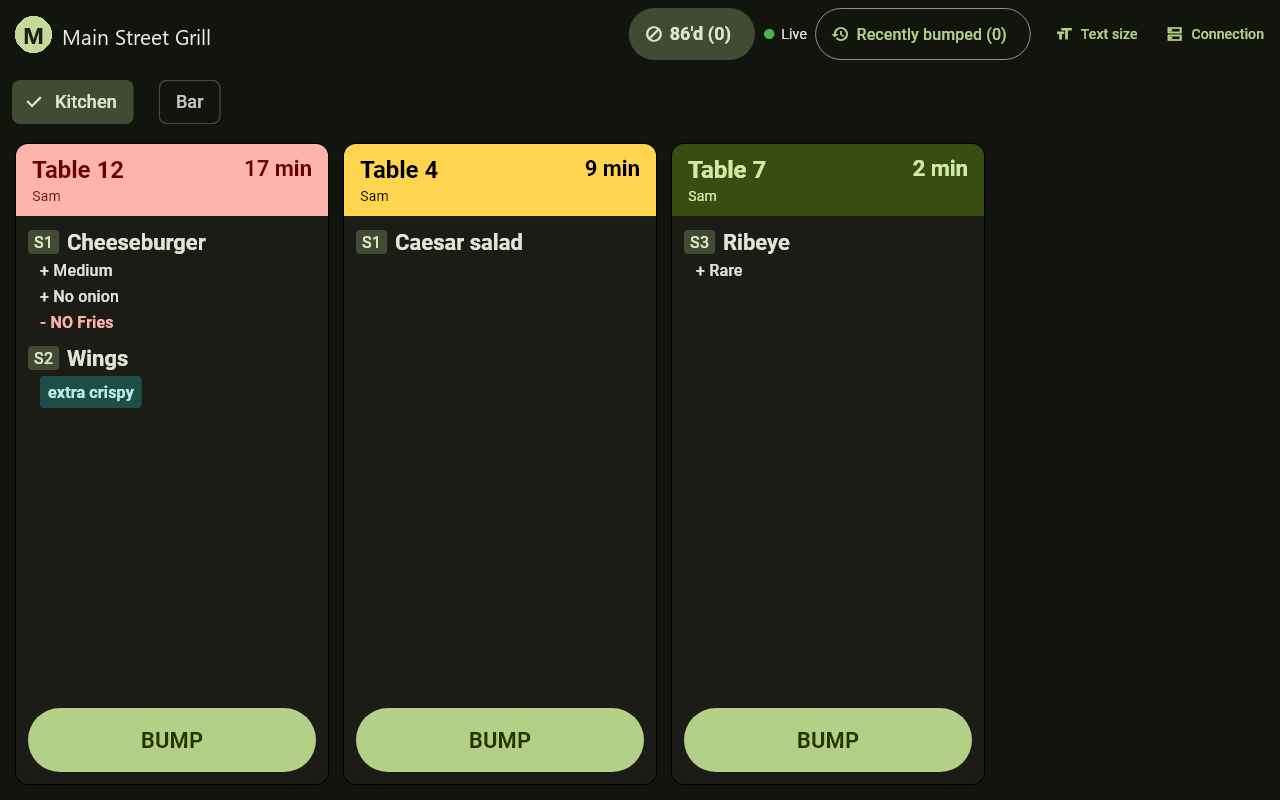
Tickets fire straight to the line
Every send lands on the kitchen screen the instant it is tapped, grouped by station, with seat numbers, choices, what the guest took off, and a timer that turns red when a ticket is waiting too long. Bump it when it goes out, recall it if you need it back.
- Kitchen and bar stations, each with its own queue
- Thermal printers routed by station and category, with reprint from the terminal
- 86 board shared by the kitchen and every terminal
- Cook sign-in and cook ratings, so you know who was on the line
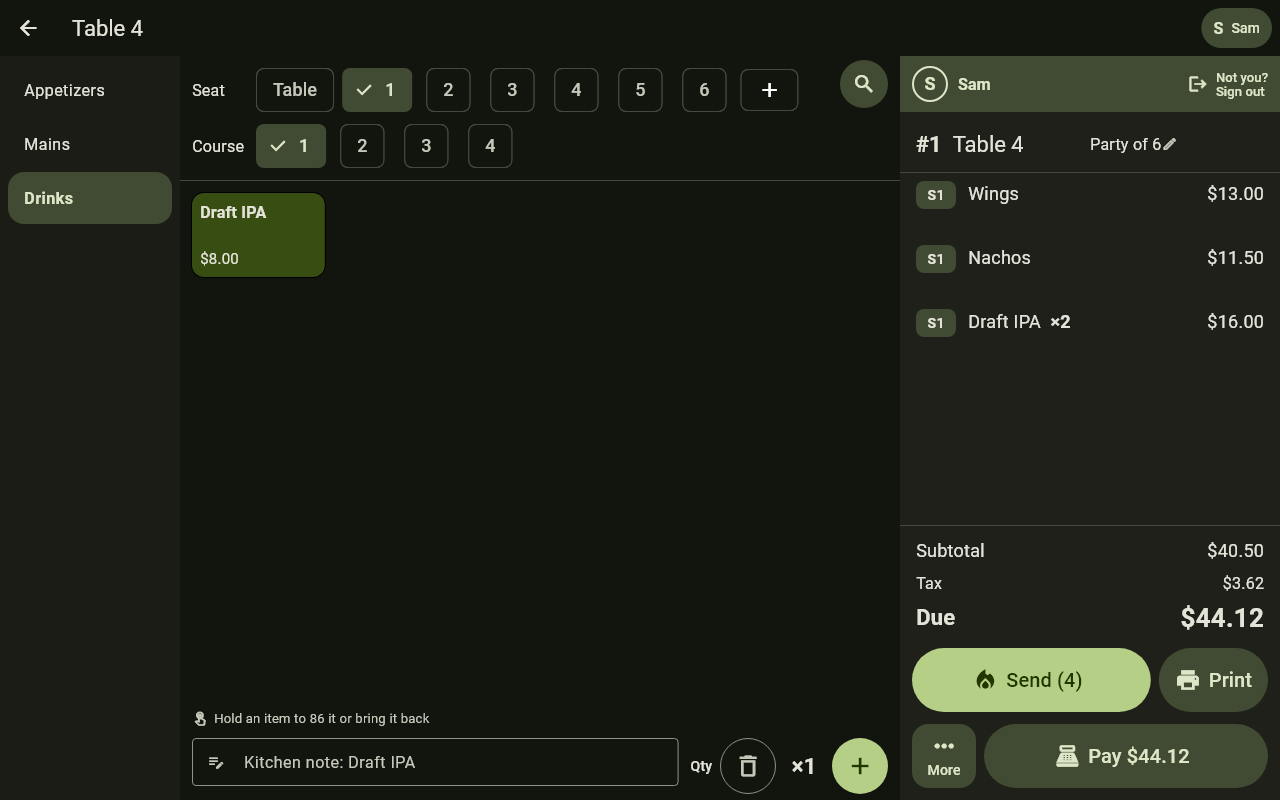
Ordering built for one hand under pressure
Seats and courses across the top, categories down the side, the ticket always in view, and Send and Pay where a thumb lands. Split a check by seat, by item, evenly or by amount. Open a bar tab on a card. Add a kitchen note without leaving the screen.
- Seat-numbered items, courses, modifiers, open-price items
- Card tips written on the receipt, the way table service works, with cash, gift and loyalty tenders
- Discounts, comps, voids and refunds, each with a reason and a manager's approval where it matters
- Auto-lock when a tablet is left on the bar, and large text for anyone who wants it
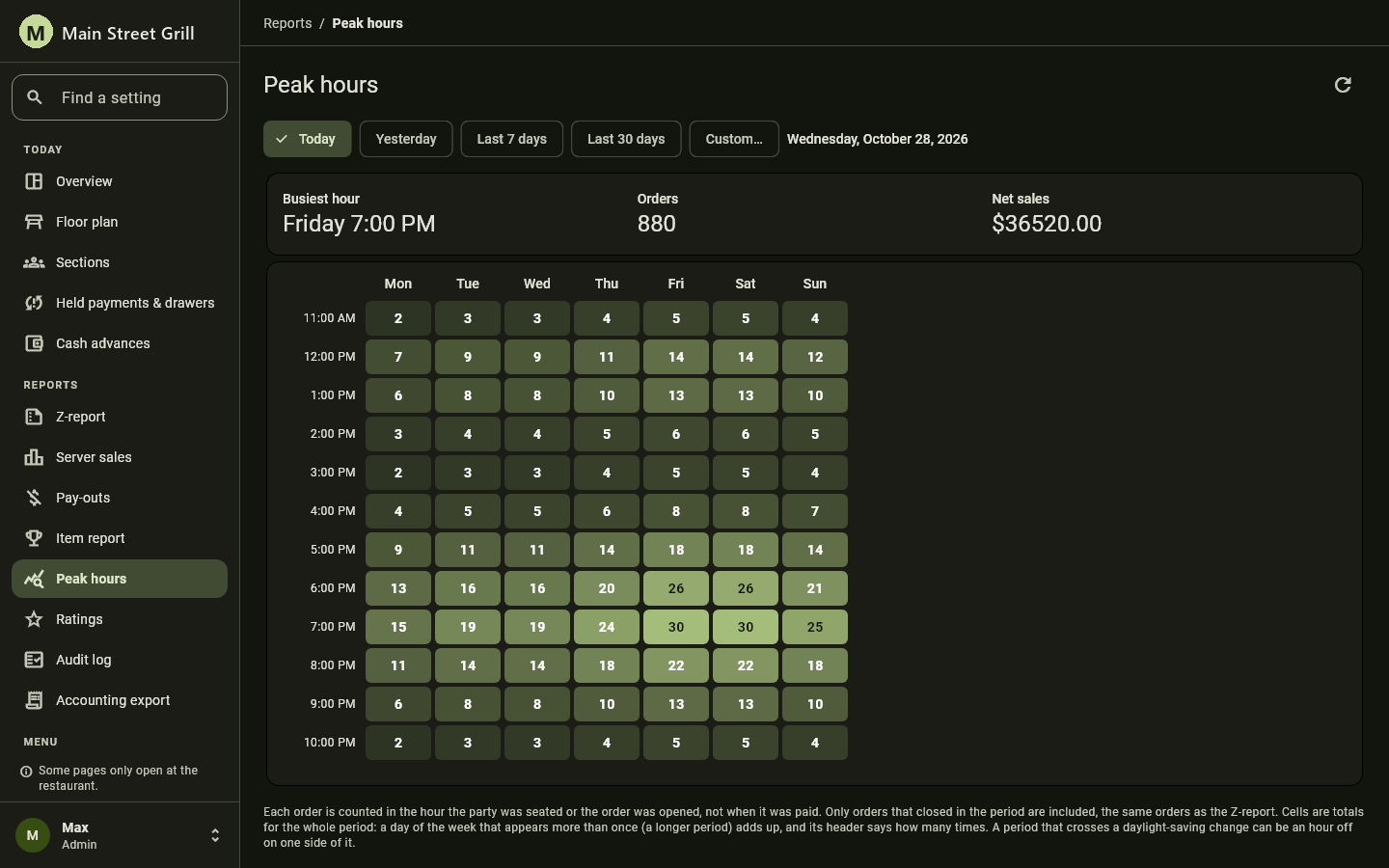
The dashboard, from the restaurant or from home
The same dashboard runs on site and on the web with a login, no VPN. Find any setting by typing what you are looking for. Reports open for the day, the week, or any range.
- Peak hours heat map by weekday and hour
- Item report with units, comps, sales and share of revenue
- Z-report, server sales, pay-outs, labor cost and ratings
- Every void, comp, refund and discount in the audit log
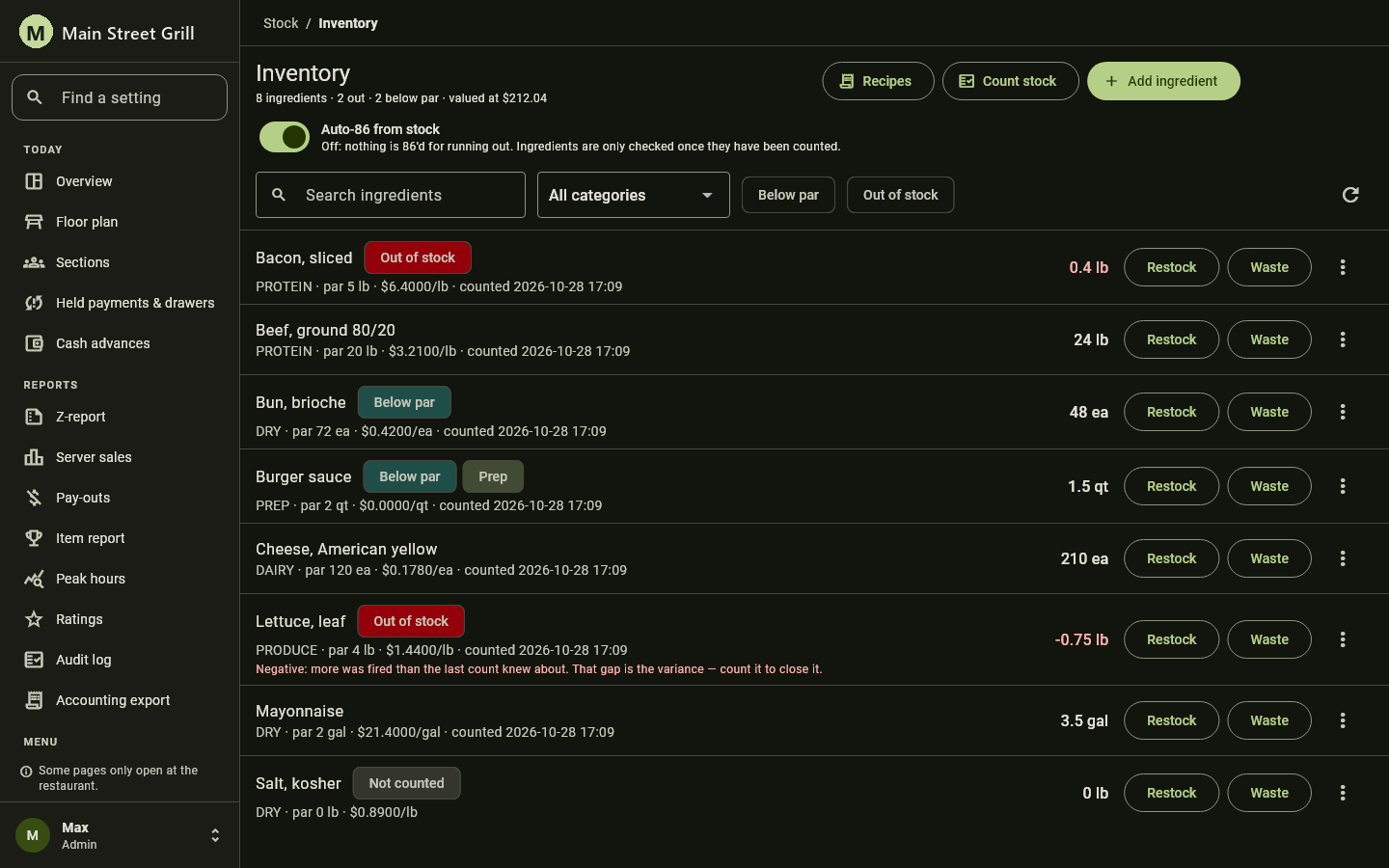
Know what's in the walk-in without walking in
Ingredients carry a par level, a unit cost and a last count. Dishes carry recipes, so every sale draws down stock. Restock and waste are one tap. A count shows what went missing. Turn on auto-86 and a dish that runs out disappears from the menu on its own.
- Below-par and out-of-stock filters
- Prep items that are themselves made from ingredients
- Stock valued at cost, on the page
Built to keep working through a Friday rush
A POS is only as good as it is during the worst hour of the week.
Runs on site, survives the internet
The server lives in your restaurant, so service does not stop when the connection does. Terminals queue orders and payments locally and sync when they reconnect.
Secure card handling
Card data goes straight to the certified payment processor and is never stored by the POS. More than one processor is supported, so you are not locked into one rate.
Roles, approvals and a record
Server, manager and admin roles with a permission matrix you set. Destructive actions sit behind a confirm or a manager's PIN, and every one of them is in the audit log with who, when and why.
Custom Software
When your business has needs that standard software doesn't meet, we build it. We work closely with you to understand the problem, then design, develop, and support a solution that fits.
- Business and line-of-business applications
- Internal tools, dashboards, and reporting
- Workflow automation and data processing
- Ongoing maintenance and support
Integrations
Your systems work better together. We connect the software your business depends on so data flows where it needs to go.
Payment processing
Integration with payment gateways and processors for in-store and online transactions.
Accounting & ERP
Syncing sales, inventory, and financial data with the platforms your team already uses.
APIs & data
Connecting third-party services, APIs, and data sources into reliable automated pipelines.
See V POS on your own floor plan
Tell us about your restaurant and we'll set up a demo with your menu and tables.